

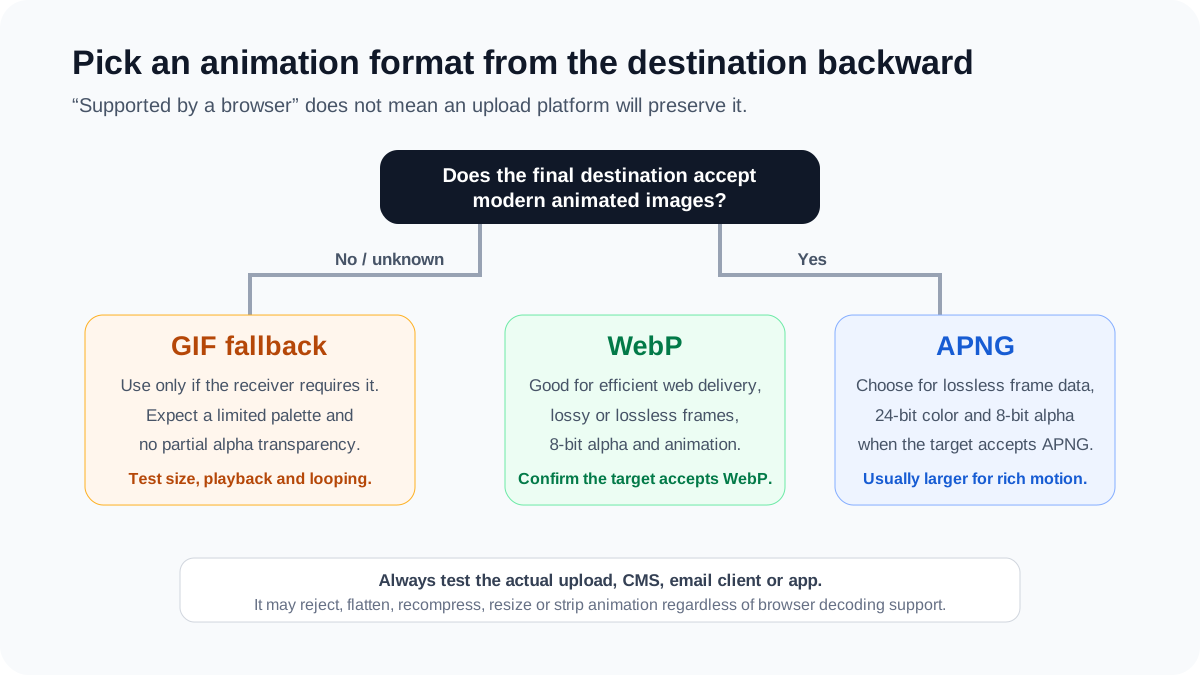
Animated WebP, APNG and GIF can all deliver short looping raster motion, but they make different trade-offs. WebP supports lossy or lossless animated frames with 8-bit alpha. APNG stores lossless frames with 24-bit color and 8-bit transparency. GIF remains a compatibility fallback with a palette of up to 256 colors and no partial alpha transparency.
Last reviewed: August 13, 2026. This guide is intentionally evergreen even though its existing URL contains “2025.” APNG’s current standards status was checked against the W3C PNG Third Edition; WebP behavior was checked against Google’s container specification. Original measurements come from the downloadable WebP Image Guides Research Pack v1.0.
Quick decision
| Choose | When it is a good starting point | Main limitation to test |
|---|---|---|
| Animated WebP | Efficient modern web delivery, with lossy or lossless frames and alpha | The destination may reject or transcode WebP even when the browser can display it |
| APNG | Lossless animation with full-color frames and smooth alpha edges | Lossless files can become large for photographic or gradient-heavy motion |
| GIF | A receiver explicitly requires GIF or its workflow is unknown and old | 256-color palette, binary transparency and potentially high byte cost |
| Video | Long, large, photographic or high-frame-rate motion | Autoplay, controls, accessibility, audio and embedding requirements |
What each format can store
Animated WebP
The WebP container specification defines an animation header and one or more animation-frame chunks. Each frame has a position, size, duration, blending method and disposal method. Frames can use WebP’s lossy VP8 coding or lossless VP8L coding, and the container supports 8-bit alpha.
This flexibility means “animated WebP” is not one quality or size class. A lossless file with soft gradients can behave very differently from a lossy file containing flat motion. Encoder effort, frame differencing, blending, disposal and the content itself all affect the result.
APNG
APNG is no longer merely an unofficial browser extension. The PNG Specification (Third Edition) became a W3C Recommendation on June 24, 2025 and formally defines APNG frame-based animation, its acTL, fcTL and fdAT chunks, and the image/apng media type. An APNG stream remains a PNG stream with additional animation data.
APNG is intended for lossless animation with 24-bit color and 8-bit transparency, improving on GIF’s palette and transparency constraints. A decoder that does not understand the animation chunks can display the static PNG image. That fallback behavior should still be tested in the exact application.
GIF
GIF is an indexed-color format. A frame’s palette can contain no more than 256 colors, and its transparency mechanism identifies a transparent palette entry rather than storing a smooth alpha channel. Soft shadows, anti-aliased transparent edges and rich gradients may therefore show contouring, dithering or a harsh fringe.
GIF’s continued value is workflow compatibility, not automatic efficiency. It can be larger than modern alternatives, especially for full-frame motion, noise or gradients. It can also be smaller in a particular simple case. Measure the actual sequence instead of assuming the age of a format determines its byte size.
Original test: three animations, four encodes each
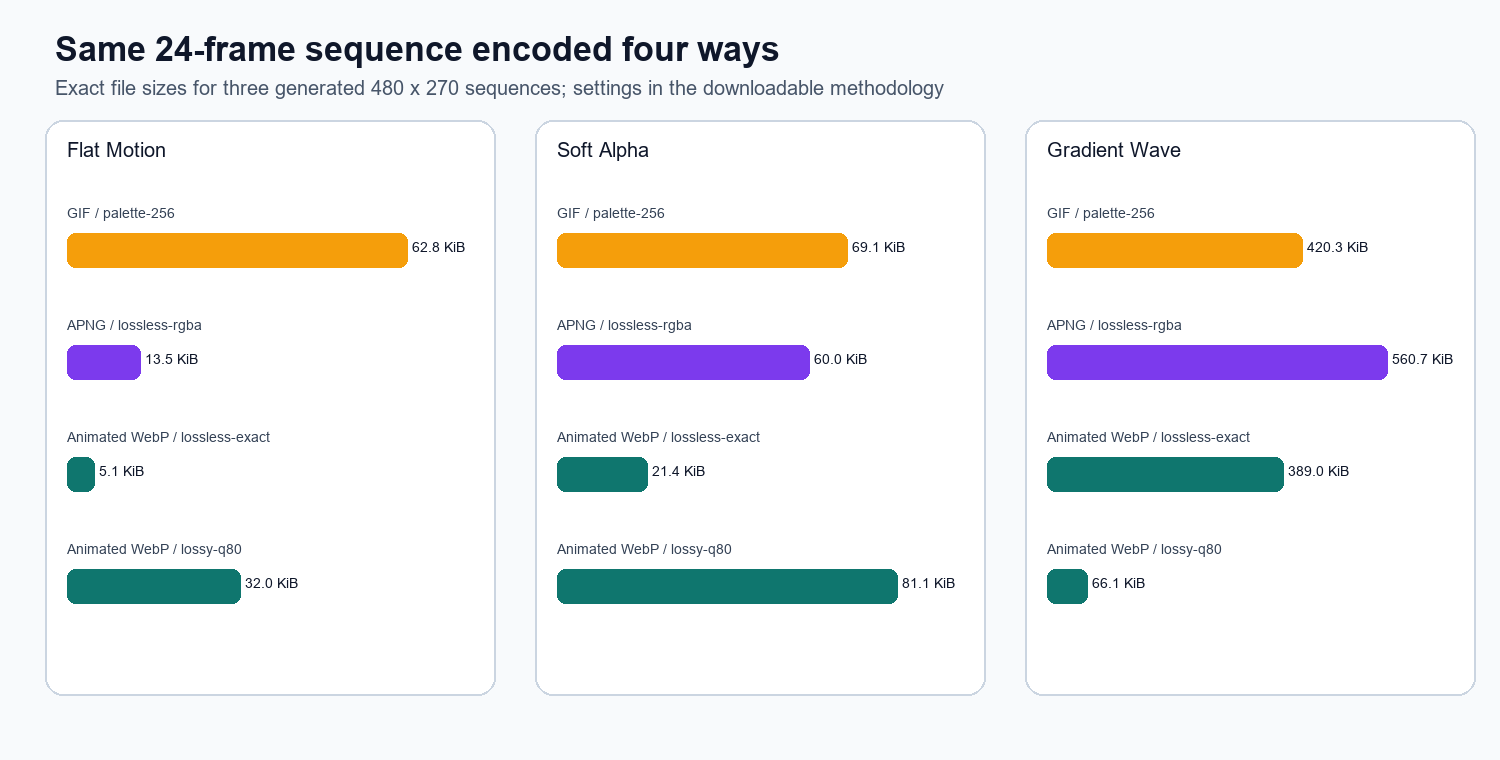
We generated three deterministic 480×270 RGBA sequences: flat motion, soft alpha and a moving gradient wave. Each sequence has 24 frames at 50 milliseconds per frame. The same source frames were encoded as 256-color GIF, lossless APNG, lossless-exact animated WebP and lossy animated WebP at quality 80. Every output was decoded again and checked for frame count.
| Sequence | GIF | APNG lossless | WebP lossless | WebP Q80 |
|---|---|---|---|---|
| Flat motion | 62.8 KiB | 13.5 KiB | 5.1 KiB | 32.0 KiB |
| Soft alpha | 69.1 KiB | 60.0 KiB | 21.4 KiB | 81.1 KiB |
| Gradient wave | 420.3 KiB | 560.7 KiB | 388.9 KiB | 66.1 KiB |
The test produces several useful but narrow observations. Lossless animated WebP was the smallest of the three lossless-or-palette choices for every generated sequence. Lossy Q80 WebP was dramatically smaller for the gradient wave, but it was larger than lossless WebP—and even larger than GIF and APNG—for the soft-alpha sequence. A “lossy” label does not guarantee a smaller file under every encoder configuration.
APNG and lossless WebP decoded exactly to the generated source frames in this test. GIF did not: mean source PSNR was 24.0 dB for flat motion, 21.8 dB for soft alpha and 27.0 dB for the gradient wave. Lossy WebP Q80 produced 41.6, 44.7 and 41.8 dB respectively. These metric values describe the test fixtures; they are not universal perception thresholds.
The study does not test browsers, CPU use, battery use, streaming, real platform uploads, corrupted files or all encoder settings. Three synthetic sequences cannot establish a global format ranking. They do show why a responsible comparison must publish the frames, settings, output files and checksums.
How to test an animation for production
- Keep one source sequence. Export all candidate formats from the same frames, dimensions, duration and loop count.
- Record the encoder. Save the software version and every quality, effort, palette, blending and disposal setting.
- Verify decoded frames. Check the frame count, canvas size, timing, loop behavior and first/static frame.
- Inspect difficult areas. Examine gradients, small text, fast edges, soft alpha and areas where one frame is disposed before the next.
- Measure bytes and decode behavior. File size alone does not capture smooth playback or resource use.
- Test reduced motion. Motion that is decorative or nonessential should respect user preferences or have a static alternative.
- Upload to the real destination. Download the served result and check whether it was resized, flattened, recompressed or converted.
Do not rely on platform folklore
Lists claiming that a social network, email provider or design platform “supports” a format age quickly and often omit the upload path. A service can display WebP on its own pages while rejecting user-submitted WebP. It can accept APNG but serve only the static frame, or accept GIF and transcode it to video. Account type, application version and delivery surface can also differ.
The maintained MDN image-format guide is useful for current browser-level guidance, while the W3C and Google specifications define the formats themselves. Neither source guarantees that a third-party upload processor preserves your file. For platform-specific publishing, run a dated acceptance test and record the result.
Converting an animated WebP on this site
The WEBP to PNG converter does not claim to create APNG. Its safe default exports the first decoded frame as one static PNG. In a browser that supports the full frame-decoding path, the “All frames as ZIP” option exports numbered PNG frames plus a timing manifest. The ZIP contains a frame sequence, not an animated PNG.
In a functional check on August 13, 2026, a 380,850-byte Google-hosted animated WebP activated both controls. The default first-frame path reached a converted state; after selecting “All frames as ZIP,” the page reached a converted state and exposed a ZIP-download control. This single-input check verifies the current interface path, not frame fidelity across every browser.
Use “select,” “add,” “drop” or “paste” when describing the action. The image conversion itself is local to the browser; saying “upload” can wrongly imply that the selected image is sent to a conversion server. Normal page, analytics and advertising requests remain separate from the image-processing path.
- Up to 20 WebP files can be selected in one batch.
- Each source file can be up to 50 MB.
- The first-frame option creates one static PNG.
- The supported all-frames option creates numbered PNG files and a timing manifest in a ZIP.
- Frame extraction does not restore detail already lost by lossy WebP encoding.
When to use video instead
Consider video when motion is long, large, photographic, high frame rate or central to the experience. Video containers and codecs are designed for temporal compression and streaming, and HTML video offers controls and media-oriented behavior. A tiny looping reaction or transparent UI flourish may fit an animated image; a tutorial, product demonstration or cinematic hero often should not.
Accessibility still matters. Avoid rapid flashing, supply a pause mechanism where required, do not put essential instructions only in motion, and provide an equivalent static or textual alternative. Format efficiency does not make distracting or unsafe motion acceptable.
Frequently asked questions
Is APNG now part of the official PNG specification?
Yes. APNG is defined in the W3C PNG Specification (Third Edition), published as a Recommendation on June 24, 2025. Older articles describing APNG as permanently unofficial should be updated.
Is animated WebP always smaller than GIF or APNG?
No. It was smaller in several configurations in our three-sequence test, but lossy Q80 WebP was the largest file for the soft-alpha fixture. Content and encoder settings determine the result.
Does converting animated WebP to PNG preserve animation?
A single ordinary PNG is static. On this site, choose the first frame as a static PNG or export supported frames as a ZIP. The converter does not produce APNG.
Which format has the best quality?
APNG and lossless WebP can reproduce a suitable source losslessly. GIF’s palette and transparency constraints can change rich or translucent material. Lossy WebP trades decoded fidelity for potential size savings. “Best” depends on the required appearance, features, destination and bytes.
For static format selection, see PNG vs WebP vs JPEG. For transparency details, use the alpha-channel guide.
Three real-world animation scenarios
A transparent loading indicator: start with lossless animated WebP and APNG candidates built from the same RGBA frames. Inspect the soft edge on several backgrounds and verify that disposal does not leave a trail. Use GIF only if the destination requires it, because binary transparency can turn a soft edge into a fringe.
A short reaction or decorative loop: compare lossy animated WebP with the platform’s accepted fallback. A small preview on your own site may work well as WebP, while a messaging or social upload path may transcode it. Test the served copy and confirm that timing and looping still feel intentional.
A product demonstration: if the sequence is long, photographic or important to understanding the page, use video as the primary candidate. Provide controls or a pause mechanism where appropriate and pair the motion with text. An animated image with dozens of full-resolution frames may consume more bytes and memory while offering fewer controls.
Publish a dated acceptance record
For each destination, record the test date, account or application tier, input checksum, accepted extension and MIME type, served output format, dimensions, byte size, frame count, duration, loop behavior and alpha result. Mark the finding as a platform observation, not a permanent format fact. Repeat the test after a major app, browser, CMS or media-pipeline update.
This small record is more reliable than a long undated compatibility table copied between articles. It also distinguishes three separate questions: whether the format specification supports a feature, whether the browser can decode it, and whether a particular upload service preserves it.
Keep the original frame sequence alongside every delivery derivative. When requirements change, re-encode from those source frames instead of transcoding an already compressed GIF, APNG or WebP and compounding earlier limitations.